
A hands-on look at deploying and managing Azure PostgreSQL Flexible Server with Pulumi, combining Python-based IaC with DevOps best practices.

Door Rick Slinkman – Cloud / Software Engineer bij Hightech Innovators
Since the summer of last year, I, together with colleagues at HighTech Innovators, have been working at the Nationale Databank Flora en Fauna (NDFF) of the Netherlands. This organisation collects and maintains all kinds of data about nature in our country. Local and national governments as well as research organisations use this data to help make decisions that affect us all. That is why keeping this data safe in a secure database is one of the most important jobs we have. Being in transition as an organisation, this also means new ways of storing data and providing secure access to it. The applications built by our teams rely on the availability of a Postgres database and it’s up to me to provide one.
My role within the NDFF of Cloud Architect is complemented with being the Cloud Engineer as well. On top of designing the NDFF’s road to the cloud, I also get to implement it. NDFF had chosen Microsoft Azure as their cloud of choice and got me on board to get them into the cloud. Since the company has all their code and CI pipelines in another place, a bridge to the cloud had to be made.
At NDFF, we see great value in open-source software. When choosing a programming language, a framework for applications or tools to use, the open-source option is often the best candidate for us. We use commercial products when we see the benefit of it but will always compare it to open-source alternatives. With rumours of Terraform becoming closed source (which indeed happened), we opted for Pulumi instead. Another argument for Pulumi was that it allows us to write Python code, something my colleagues already knew how to do, but this time for our infrastructure. We were looking for infrastructure-as-code tooling and we have found it in Pulumi.
Pulumi has been a great choice for maintaining the cloud resources we need in Azure. You can write your code in TypeScript, Python, Java, C# or Go. It works for Google Cloud and AWS (and many other providers) as well, and in this case uses Azure ARM under the hood to interact with our cloud environment when we rollout our infrastructure. On top of the Pulumi base code, there are many libraries that enable you to use specific (Azure) resources and configure them to your needs. One of those libraries is the pulumi_azure package and specifically the Postgres module within it. It has all the Azure Postgres offerings defined as classes, where the constructor parameters are the various options you can configure on the cloud resource.
The option we chose at NDFF was the Azure Postgres Flexible Server. This is in essence a basic virtual machine with Postgres installed on it. You can provide the desired Postgres version number as a parameter, and it allows to flexibly scale up storage if your database size grows. The size of the virtual machine can also be configured with a parameter, allowing for a heavier machine if you need it. In Pulumi, you can just define your Postgres Flexible Server as a variable in python, like so:
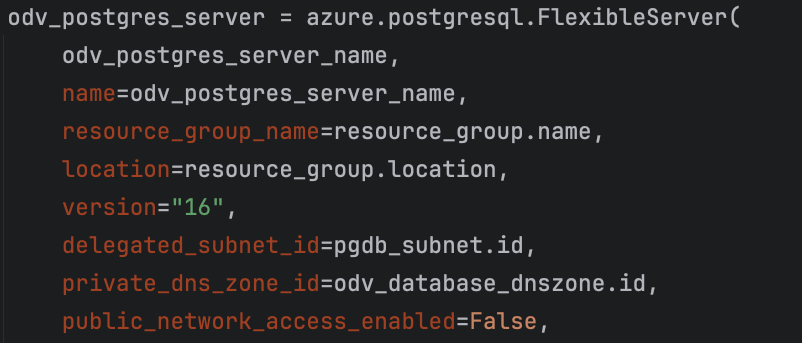
https://www.pulumi.com/registry/packages/azure/api-docs/postgresql/flexibleserver
This is not the full configuration of our database, but it shows how we configure everything in code that you would normally configure in the Azure Portal. Many of the parameters of the FlexibleServer are instances of other Azure resources, like the Subnet within the VirtualNetwork, or the ResourceGroup. These are all defined earlier in the Python code.
Since all (Azure) resources in Pulumi are classes, we’re able to separate all our infrastructure code into separate Python files. Each file has the responsibility of abstracting the configuration of a few of the resources that make up our environment. Doing this is really a must, because there are so many things to configure with Pulumi that the code for your infrastructure easily becomes a few hundred lines long. When rolling out your infrastructure, Pulumi will read your code from top to bottom, so we define functions in Python as follows:
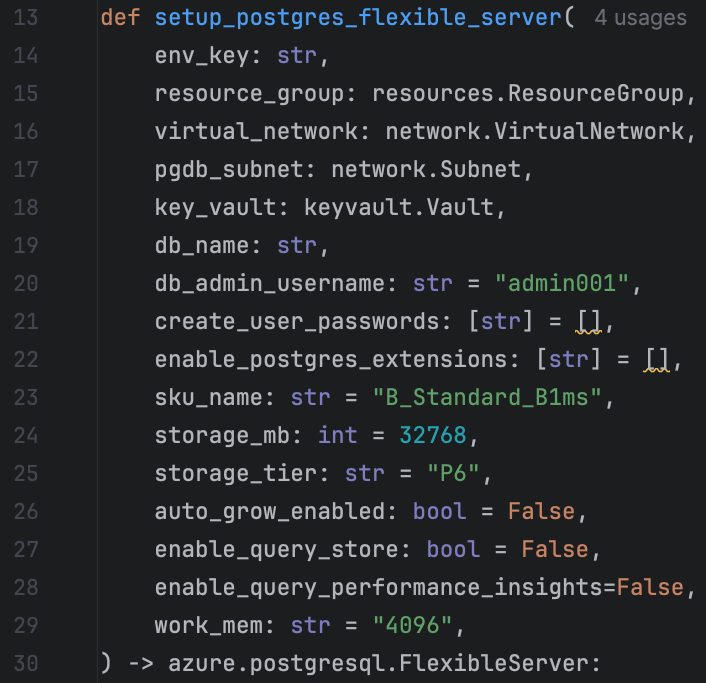
This immensely simplifies setting up the Postgres Flexible Server. A great improvement, because now our backend engineers can make sense of how the infrastructure is set up. This lowers the burden on the cloud engineer (me) and increases the opportunity to lean more towards a DevOps state of mind. For reference, this function definition abstracts away just under 200 lines of complex configuration for the Flexible Server. Calling this function sets up a Flexible Server or updates it if it already exists in the target environment. Prepopulating the Flexible Server with a Postgres database, one that applications can actually connect to, is done just as easy within the function:
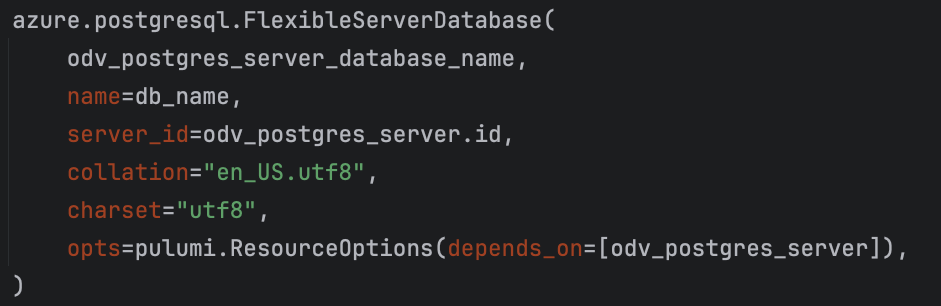
https://www.pulumi.com/registry/packages/azure/api-docs/postgresql/flexibleserverdatabase
Not only our backend engineers are able to work on our infrastructure projects. When testing our applications told us our database was responding too slowly, we were able to easily tweak very specific Postgres configuration within the Flexible Server. The stuff you normally configure in your “postgres.conf” file on the server level. Working together with our database specialists, we used Pulumi to apply these configurations on the Flexible Server too. Extensions we use in our database like PostGIS, which enables use of geographic objects on location data, are enabled with only a few lines of code from a database specialist who knows how to write Python:
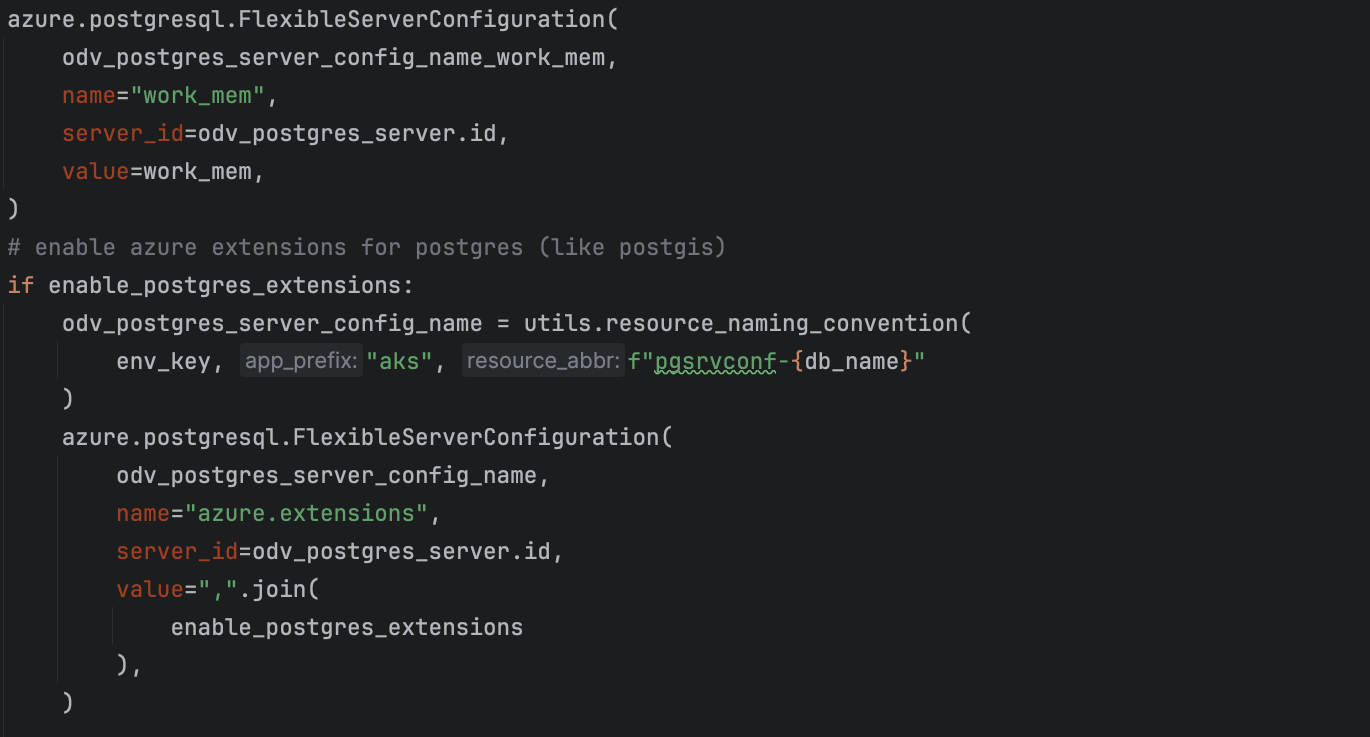
https://www.pulumi.com/registry/packages/azure/api-docs/postgresql/flexibleserverconfiguration
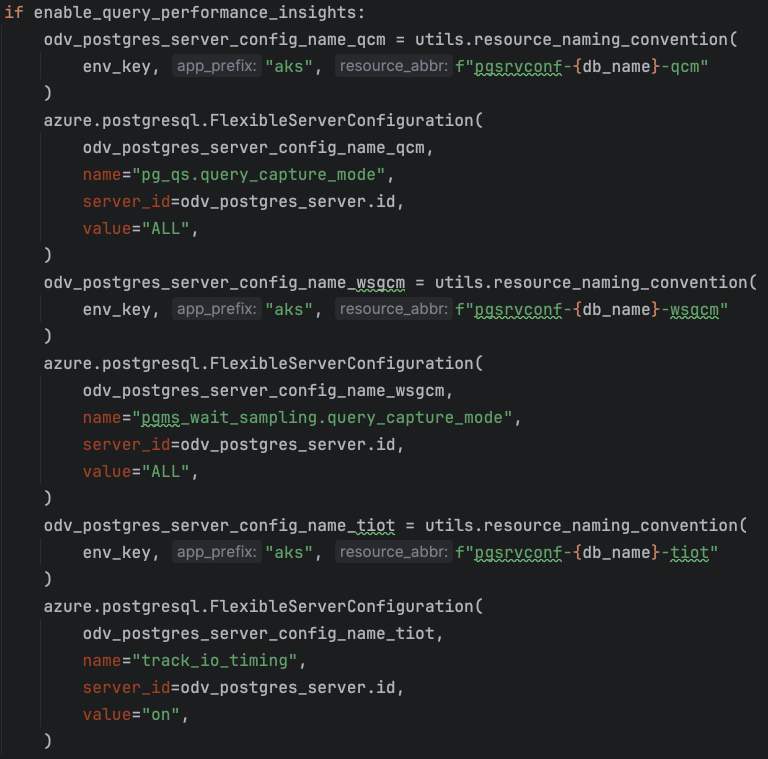
A nice feature of the Azure Postgres Flexible Server is the ability to get performance insights on the queries that are run on the database. You can enable it by going deep into the Azure Portal to enable a few settings, but since we use infrastructure-as-code, we configure this using Pulumi too. The Azure Portal specifies three settings to be configured:
Now, by just switching our function parameter to True, the Query Performance Insights can be enabled:
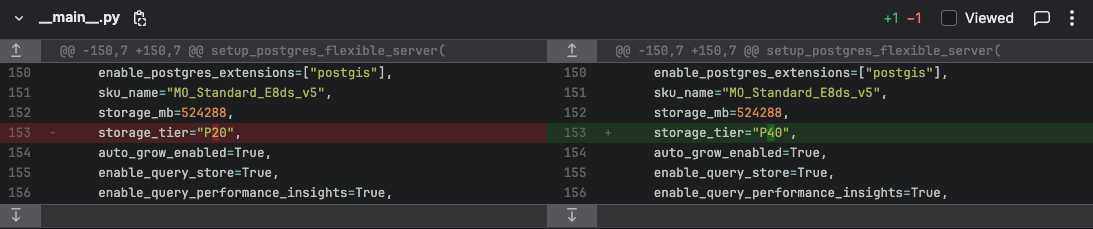
When our data scientists found that the database was reacting too slowly, we chose to increase the storage tier of our Postgres Flexible Server. This allows to use more Disk IOPS, which helped greatly in speeding up the database population process. Since our Pulumi code is stored in git, they can easily request the database to be upgraded by simply performing a pull request on the infrastructure project. They will have it reviewed by the operations people (me) after which it is deployed to Azure. Within a couple of minutes, the data science team can enjoy their larger and faster database.
The reviewing is not only done by me as the Cloud Architect/Engineer. The benefit of having our software in git is that we can use CI pipelines to verify the correctness of our Pulumi code. We have setup a CI pipeline to perform lint checks on our code and use the “pulumi preview” options to verify that a rollout will be successful. Building pipelines with various checks is what we normally do for our applications, so it helps our non-operations colleagues to feel more comfortable when helping develop our infrastructure. While the Cloud Engineer (me) is largely responsible for this project, it has been great to work together with the various disciplines that NDFF has on board.
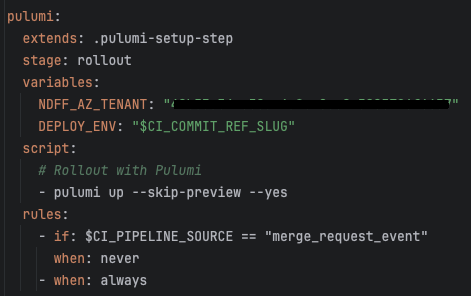
Deploying all kinds (Azure) resources to the cloud requires having access on a pretty high level within the Azure tenant. This is not a responsibility we want our colleagues to have, since people (everyone) can fall for a phishing scam, no matter how trained they are. Having a dependency on a single colleague is also a bad idea, so we heavily invested in a robust pipeline to deploy our Azure resources with Pulumi in an automated way. Having this setup allows us to deploy our infrastructure to Azure as often as we want, with just a simple press of a button.
When pull requests are merged, the pipeline is automatically triggered to rollout the latest changes. After completing its initial setup steps to get in sync with the current state of the infrastructure, it connects to Azure to update all resources that require it. Initially, this pipeline was set up by the operations people (me) but is now used by most colleagues who work on the project.
Using Pulumi to deploy our infrastructure, and specifically our Azure Postgres Flexible Servers, has been a great experience for myself and the team. With every update to our Pulumi code, we gain more detailed control over the Azure environment. Having only little experience with databases on the operations side, this has been an interesting learning experience for me. It has been great to see the combined effort of our teams in getting a cloud database running that meets their requirements in terms of performance and availability. The feeling of being in control takes away stress and insecurity about the reliability of our infrastructure. That has helped greatly in finding focus for the things that really matter at NDFF, having accurate and secure data about nature in the Netherlands.
I can personally recommend using Pulumi for deploying your infrastructure, whether it is to Azure, Google Cloud, AWS or any other supported provider. The Pulumi project and its extensions are constantly in development with support being added for new cloud resources nearly every day. Being adopted by the Cloud Native Computing Foundation (CNCF) is a great sign that it will probably stay along for a while. Pulumi is open source in nature, but professional support services are available at a price. If you find yourself in the situation where Pulumi is a viable alternative, please check it out!